

How to find an available domain name
Before we can create your website, we need to know what domain name, or website address, you would like to use. This guide shows you how to check if your preferred domain is available.
Why check your domain name first?
Your domain name is the website address people will use to visit your site.
For example, this could be something like yourbusinessname.co.uk or yourbusinessname.com.
We recommend checking your preferred domain before completing your sign-up form, so we know which available domain you would like us to use for your website.
Step 1: Go to DomainTyper
To check your domain name:
- Open your web browser, such as Chrome, Safari or Edge.
- Go to www.domaintyper.com.
Step 2: Type your business or brand name
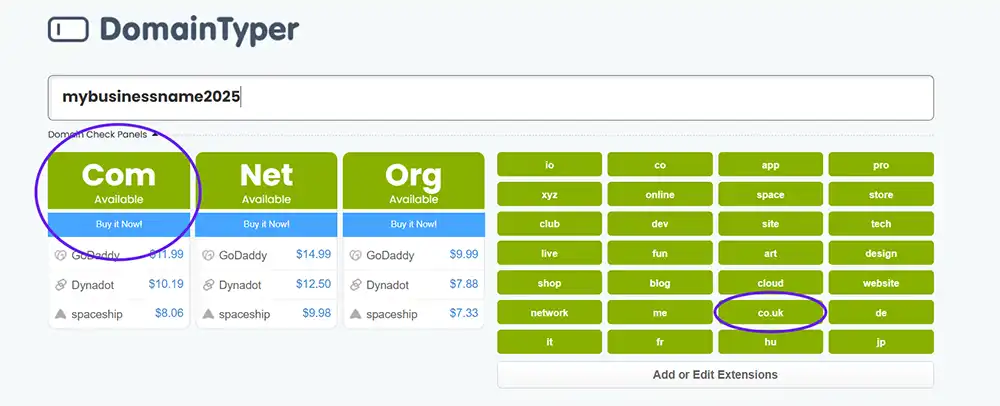
Once you are on DomainTyper, use the large search box in the middle of the page.
- Type your desired domain name, such as mybusinessname.
- The website will automatically check if the domain is available.
- Look for a .com or .co.uk domain that is available.
Click image to open larger
Step 3: Look for .co.uk and .com results
Below the search box, you will see different domain endings, such as .com, .net and .org.
For your website, we are mainly interested in .co.uk or .com domains.
- If the result is green, the domain is available.
- If the result is red, the domain is already taken.
- If your preferred domain is available, please add it to your sign-up form.
If your business is called Sarah Beauty Studio, you could check names like sarahbeautystudio.co.uk or sarahbeautystudio.com.
Step 4: Try different ideas if your name is taken
If the domain name you want is already taken, try small changes.
For example, you could try:
- Adding the before your business name.
- Adding your location.
- Trying .co.uk if .com is taken, or the other way around.
- Keeping the name short, clear and easy to spell.
Step 5: Send us your chosen domain
Once you find an available domain you are happy with, please enter it on your sign-up form.
This helps us get your website set up with the correct website address.
Need help?
If you are having any issues, do not worry. We can help you choose a suitable available domain.
- Reply to your sign-up email.
- Or create a support ticket.